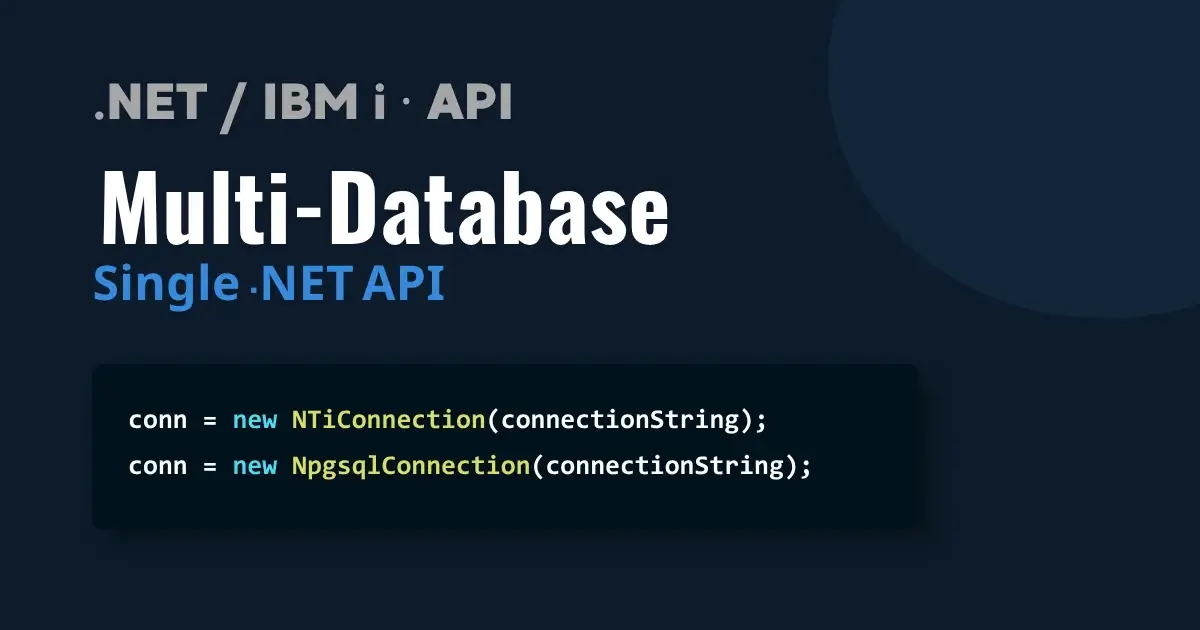
NTi Data Provider is designed for a direct connection to DB2 for i, with no middleware or additional driver. To showcase how straightforward this is, this project relies on a .NET API connected simultaneously to DB2 for i on IBM i and PostgreSQL, paired with an Angular application that displays data dynamically.
Part 1 - API creation
Step 1 - Set up the environment
The project uses ASP.NET Core API with Visual Studio, which natively includes Swagger for testing endpoints without Postman.
Three packages are required:
dotnet add package Aumerial.Data.Nti
dotnet add package Npgsql
dotnet add package Dapper- NTi - DB2 for i provider
- Npgsql - standard PostgreSQL provider
- Dapper - lightweight ORM for automatic entity mapping across both databases
Step 2 - Data modeling and service configuration
Data models structure the exchanges between the API and the databases:
namespace AccessDataAPI.Models.Northwind
{
    public class Categories
    {
        public int categoryId { get; set; }
        public string categoryName { get; set; }
        public string description { get; set; }
    }
}
namespace AccessDataAPI.Models.Hotel
{
public class Services
{
public int service_id { get; set; }
public int nom_service { get; set; }
public int tarif_service { get; set; }
}
}A dedicated connection service is configured for each database.
DB2Service - connection to DB2 for i via NTi:
using Aumerial.Data.Nti;

namespace AccessDataAPI.Services
{
    public class DB2Service
    {
        public NTiConnection conn;

        public DB2Service(IConfiguration config)
        {
            string connectionString = config.GetConnectionString("Db2Database");
            conn = new NTiConnection(connectionString);
        }
    }
}
PGSQLService - connection to PostgreSQL via Npgsql:
using Npgsql;

namespace AccessDataAPI.Services
{
    public class PGSQLService
    {
        public NpgsqlConnection conn;

        public PGSQLService(IConfiguration config)
        {
            string connectionString = config.GetConnectionString("PGDatabase");
            conn = new NpgsqlConnection(connectionString);
        }
    }
}
Step 3 - Controllers
Controllers handle incoming requests, execute the CRUD logic and return responses to clients.
NorthwindCategoriesController - GET and POST on DB2 for i:
using AccessDataAPI.Models.Northwind;
using Dapper;
using AccessDataAPI.Services;
using Microsoft.AspNetCore.Mvc;
using Aumerial.Data.Nti;

namespace AccessDataAPI.Controllers.NorthwindControllers
{
    [ApiController]
    [Route("[controller]")]
    public class NorthwindCategoriesController : Controller
    {
        private readonly DB2Service dbconn;

        public NorthwindCategoriesController(DB2Service dB2Service)
        {
            dbconn = dB2Service;
        }

        // Get categories
        [HttpGet("/categories")]
        public IActionResult GetCategories()
        {
            try
            {
                string sql = "SELECT * FROM NORTHWIND.CATEGORIES";
                var categories = dbconn.conn.Query(sql).AsList();

                if (categories != null)
                    return Ok(categories);
                else
                    return NotFound($"No categories found");
            }
            catch (Exception ex)
            {
                return BadRequest(new { Error = $"Erreur : {ex.Message}" });
            }
        }

        // Add a new category
        [HttpPost("AddCategories")]
        public IActionResult CreateCategories([FromBody] Categories newCategorie)
        {
            try
            {
                string sql = "INSERT INTO NORTHWIND.CATEGORIES (CATEGORYNAME, DESCRIPTION) VALUES (?, ?)";
                var results = dbconn.conn.Execute(sql, new
                {
                    newCategorie.categoryName,
                    newCategorie.description
                });

                if (results > 0)
                    return Ok(newCategorie);
                else
                    return BadRequest(new { Message = "Unable to add a new category" });
            }
            catch (Exception ex)
            {
                return BadRequest(new { Error = $"Erreur : {ex.Message}" });
            }
        }
    }
}
HotelServicesController - GET on PostgreSQL :
using Dapper;
using AccessDataAPI.Services;
using Microsoft.AspNetCore.Mvc;

namespace AccessDataAPI.Controllers.HotelServicesController
{
    [ApiController]
    [Route("[controller]")]
    public class HotelServicesController : Controller
    {
        private readonly PGSQLService pgconn;

        public HotelServicesController(PGSQLService pgsqlservice)
        {
            pgconn = pgsqlservice;
        }

        [HttpGet("ServicesWithinfo")]
        public IActionResult GetServiceWithInfo()
        {
            try
            {
                string sql = @"
                    SELECT s.service_id, s.nom_service, s.tarif_service,
                           r.reservation_id, r.client_id, r.chambre_id,
                           r.date_arrivee, r.date_depart, r.nombre_adultes,
                           r.nombre_enfants, r.statut
                    FROM hotel.services s
                    LEFT JOIN hotel.reservations_services rs ON s.service_id = rs.service_id
                    LEFT JOIN hotel.reservations r ON rs.reservation_id = r.reservation_id
                    ORDER BY s.service_id, r.reservation_id;";

                var results = pgconn.conn.Query(sql).ToList();

                if (results != null)
                    return Ok(results);
                else
                    return NotFound(new { message = "No services found." });
            }
            catch (Exception ex)
            {
                return BadRequest(new { Error = $"Error: {ex.Message}" });
            }
        }

        [HttpGet("ServicesReservationsCount")]
        public IActionResult GetReservationsByService()
        {
            try
            {
                string sql = @"
                    SELECT
                        s.nom_service,
                        s.tarif_service,
                        COUNT(r.reservation_id) AS reservationCount
                    FROM hotel.services s
                    LEFT JOIN hotel.reservations_services rs ON s.service_id = rs.service_id
                    LEFT JOIN hotel.reservations r ON rs.reservation_id = r.reservation_id
                    GROUP BY s.nom_service, s.tarif_service
                    ORDER BY s.nom_service;";

                var results = pgconn.conn.Query(sql).ToList();

                if (results != null)
                    return Ok(results);
                else
                    return NotFound($"No service reservations found");
            }
            catch (Exception ex)
            {
                return BadRequest(new { Error = $"Error: {ex.Message}" });
            }
        }
    }
}
Routes map specific URLs to controller actions, ensuring every request reaches the right endpoint in the API.
Step 4 - Swagger and CORS
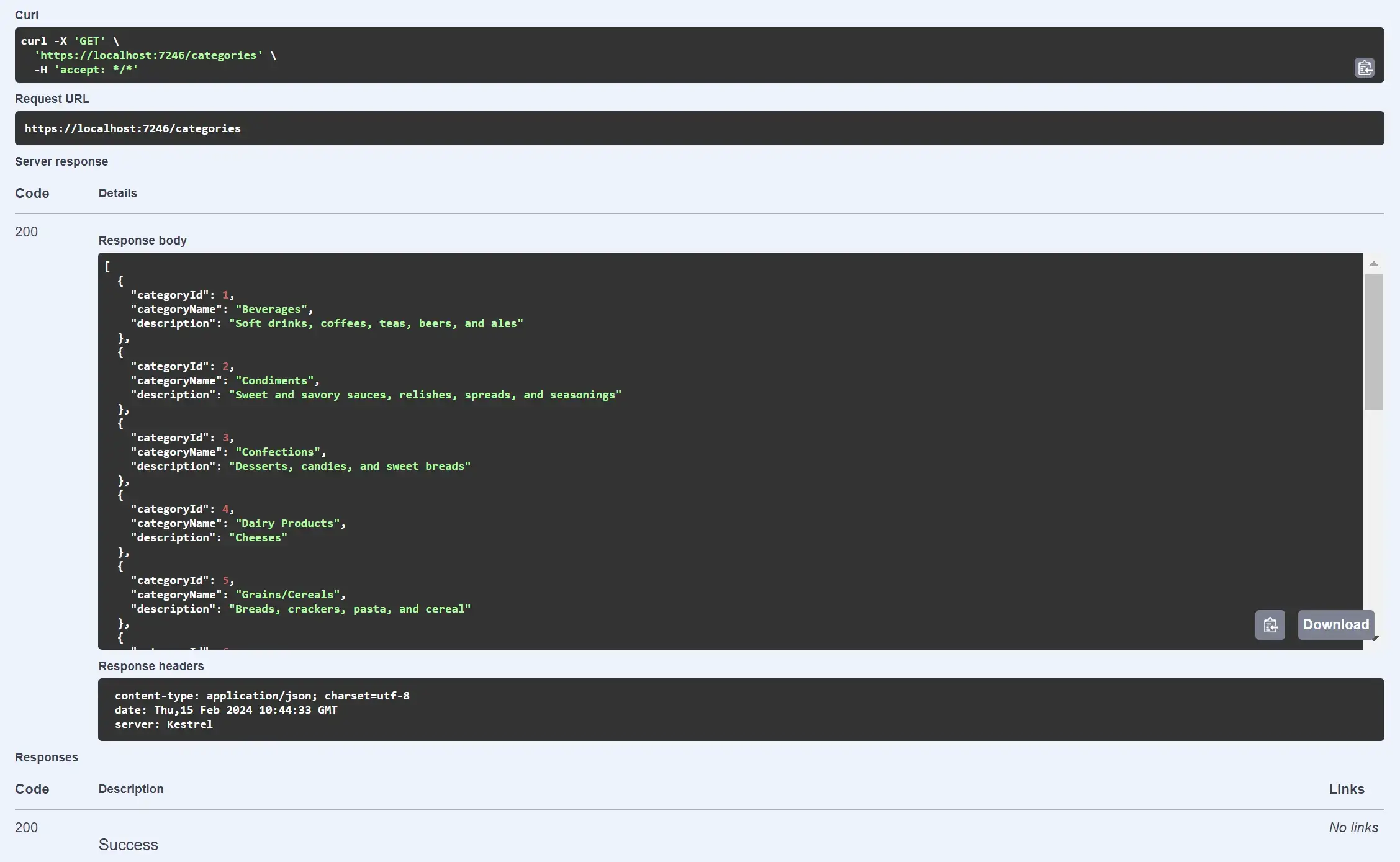
GET request result in Swagger:
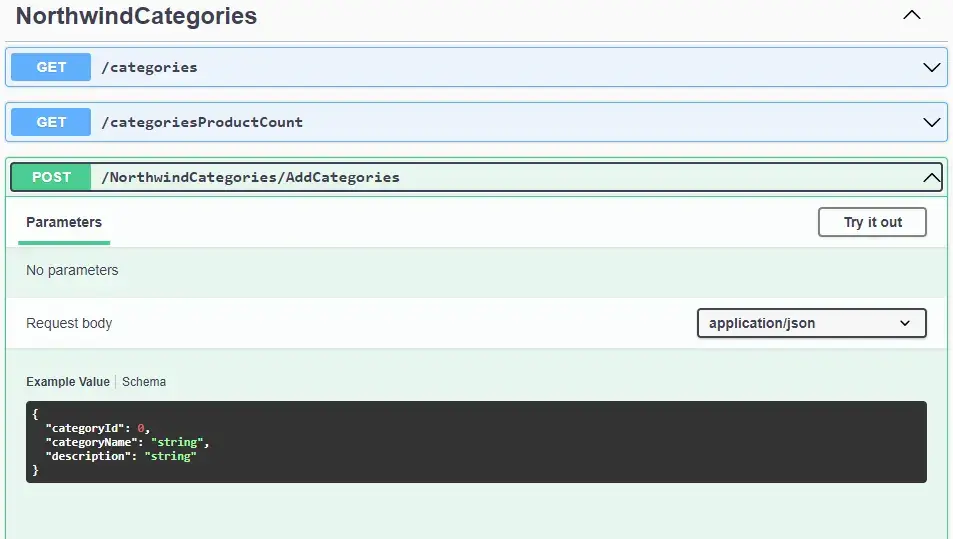
NorthwindCategories endpoints in Swagger (GET and POST):
CORS (Cross-Origin Resource Sharing) is configured in Program.cs to allow requests from the Angular application hosted on a different domain.
Part 2 - Angular application creation
Step 1 - Set up the Angular environment
The Angular environment is configured with:
- Node.js
- NPM
- Angular CLI
The MVVM design pattern separates display logic from business logic. Visual Studio Code is used for development.
Step 2 - Data models and services
A TypeScript model is defined for each entity, ensuring structured data handling throughout the application:
export class Categories {
    categoryId: number;
    categoryName: string;
    description: string;

    constructor(
        categoryId: number,
        categoryName: string,
        description: string,
    ) {
        this.categoryId = categoryId;
        this.categoryName = categoryName;
        this.description = description;
    }
}
Communication with the .NET API relies on Angular's HttpClient module to exchange data in JSON format:
import { Injectable } from '@angular/core';
import { HttpClient, HttpHeaders } from '@angular/common/http';
import { Observable } from 'rxjs';
import { Categories } from '../../models/northwind/categories/categories.model';
import { CategorieProductCount } from '../../models/northwind/categories/CategorieProductCount.model';
import { environment } from '../../../environments/environment';

const httpOptions = {
    headers: new HttpHeaders({ 'Content-Type': 'application/json' })
};

@Injectable({
    providedIn: 'root'
})
export class CategoriesService {

    private apiBaseUrl = environment.apiBaseUrl;

    private apiGetCategoriesUrl = `${this.apiBaseUrl}categories`;
    private apiGetCategoriesProductsCountUrl = `${this.apiBaseUrl}categoriesProductCount`;
    private apiAddCategoriesUrl = `${this.apiBaseUrl}NorthwindCategories/AddCategories`;
    private apiGetCategoriesWithMetaDataUrl = `${this.apiBaseUrl}/categoriesMetaData`;

    constructor(private http: HttpClient) { }

    getCategories(): Observable {
        return this.http.get(this.apiGetCategoriesUrl);
    }

    getCategoriesProductCount(): Observable {
        return this.http.get(this.apiGetCategoriesProductsCountUrl);
    }

    getCategoriesWithMetaData(): Observable {
        return this.http.get(this.apiGetCategoriesWithMetaDataUrl);
    }

    addCategories(categories: any): Observable {
        return this.http.post(this.apiAddCategoriesUrl, categories);
    }
}
Step 3 - Component development
Angular's strength lies in its components: each one consists of a TypeScript file for business logic, an HTML template and a CSS or SCSS file for styling. They can be nested to promote modularity.
The main page orchestrates the different components:
<div class="container">
    <div class="row">
        <div class="col-md-12 mt-4 text-center">
            <h1 class="mt-5">NORTHWIND DB2 for i Database<</h1>
        </div>
        <div class="col-md-12 northwind-box" id="dashboardSection">
            <app-dashboard></app-dashboard>
        </div>
        <div class="col-md-12 northwind-box" id="categoriesSection">
            <app-categories></app-categories>
        </div>
        <div class="col-md-12 northwind-box" id="clientsSection">
            <app-clients-northwind></app-clients-northwind>
        </div>
        <div class="col-md-12 northwind-box" id="productsSection">
            <app-productscomponent></app-productscomponent>
        </div>
    </div>
</div>
Each component calls its service methods to load or update data:
// CHARGER LES CATEGORIES
loadCategories() {
    this.categoriesService.getCategories().subscribe(
        (categories: Categories[]) => {
            this.categorie = categories;
        }
    );
}

// AJOUTER UNE CATEGORIE
addCategorie() {
    if (this.addCategoryForm.valid) {
        this.categoriesService.addCategories(this.addCategoryForm.value)
            .subscribe(
                (newCategorie: Categories) => {
                    this.categorie.push(newCategorie);
                    this.showCategorieForm = false;
                    this.showMessageSuccess();
                }
            );
    } else {
        window.alert('le champs nom est requis');
    }
}
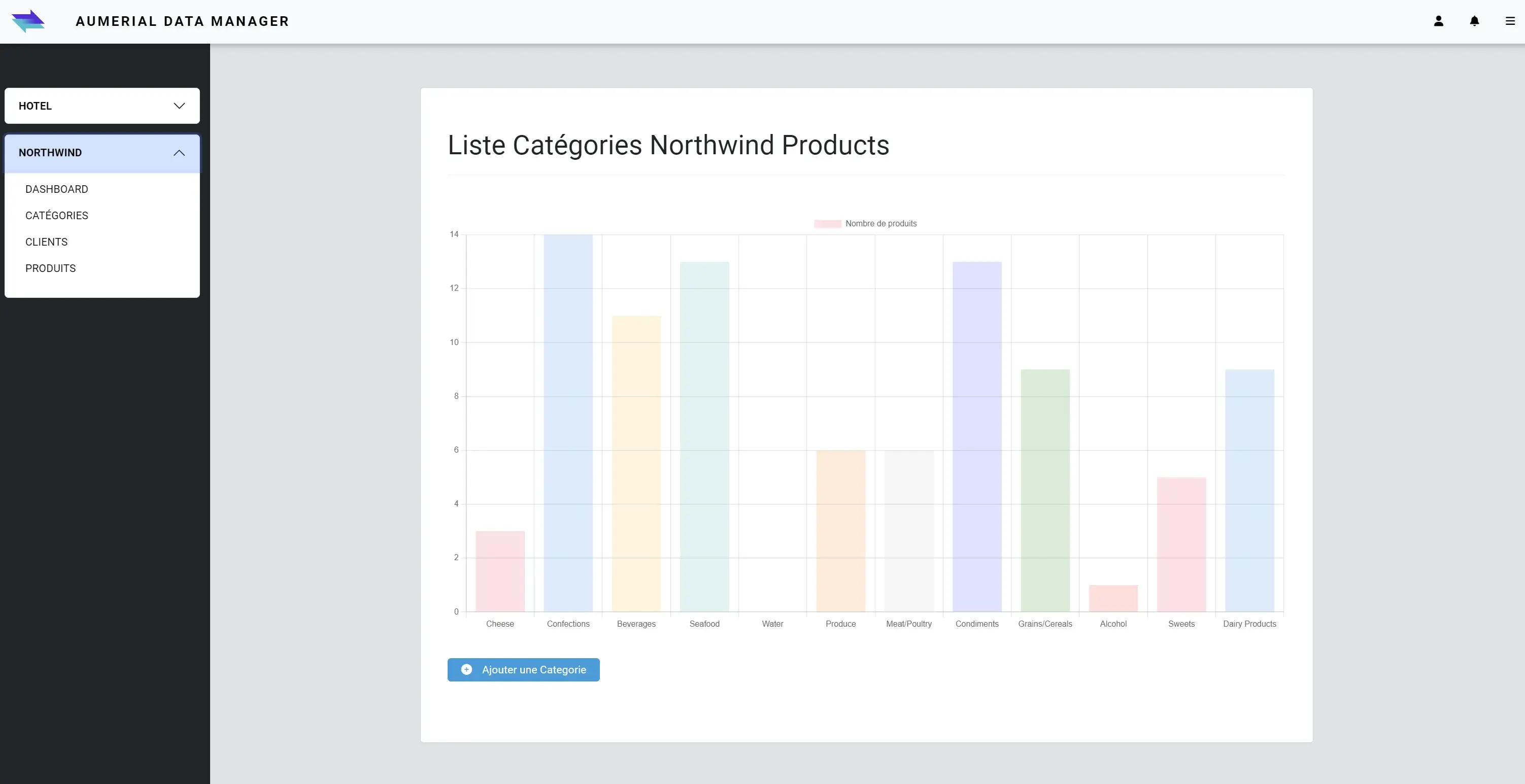
Il devient ainsi possible de créer des graphiques dynamiques en quelques lignes. Ici, un diagramme en barres affichant le nombre de produits par catégorie :
createChart() {
    const categories = this.chartData.map(data => data.categoryName);
    const productCounts = this.chartData.map(data => data.productCount);
    const colors = [
        'rgba(255, 99, 132, 0.2)', 'rgba(54, 162, 235, 0.2)',
        'rgba(255, 206, 86, 0.2)', 'rgba(75, 192, 192, 0.2)',
        'rgba(153, 102, 255, 0.2)', 'rgba(255, 159, 64, 0.2)',
        'rgba(199, 199, 199, 0.2)', 'rgba(83, 102, 255, 0.2)',
        'rgba(40, 159, 64, 0.2)', 'rgba(255, 99, 71, 0.2)'
    ];

    const categorieChart = document.getElementById('CategoriesChart') as HTMLCanvasElement;
    const myChart = new Chart(categorieChart, {
        type: 'bar',
        data: {
            labels: categories,
            datasets: [{
                label: 'Nombre de produits',
                data: productCounts,
                backgroundColor: colors,
                borderWidth: 0
            }]
        }
    });
}
Conclusion
Ce projet démontre qu'avec une bonne maîtrise de la programmation orientée objet et du SQL, dialoguer simultanément avec DB2 for i et PostgreSQL devient aussi simple qu'avec n'importe quelle autre base de données.
NTi Data Provider s'intègre dans l'écosystème .NET exactement comme avec SQL Server, Oracle, ou tout autre provider ADO.NET : même syntaxe, même logique.
Les ressources de l'IBM i deviennent une source parmi d'autres, pleinement exploitables pour construire des applications métiers modernes, et ce sans complexité ajoutée.
Quentin Destrade


