IBM i is a world-class information system, and that goes without saying. But its commitment to backward compatibility with every technique inherited from its predecessors forces it to carry resources that, while highly useful at the time, have since become quirks.
The QTEMP library, inherited from the AS/400 and S/38, is one such example. It is systematically created at job startup and deleted when the job ends. QTEMP belongs exclusively to the job that created it and is only accessible to what runs within it.
While things are straightforward in a classic IBM i usage through the QINTER and QBATCH subsystems, it gets more complex when IBM i resources are accessed via the QUSRWRK subsystem by QZDASOINIT and QZRCSRVS job types.
Code example
The C# sequence below produces exactly the same result: duplicating a table into QTEMP, with TARTICL1 created by a CPYF command and TARTICL2 by a SQL CREATE TABLE statement.
This code uses NTi Data Provider.
Try
{
   cx.ExecuteClCommand("CPYF FROMFILE(AIRELLES/TARTICL) TOFILE(QTEMP/TARTICL1) MBROPT(*REPLACE) CRTFILE(*YES)");

   cx.Execute("CREATE TABLE QTEMP.TARTICL2 AS (SELECT * FROM AIRELLES.TARTICL) WITH DATA");
}
catch (Exception ex)
{
   Console.WriteLine(ex.ToString());
}
💡A breakpoint has been placed on the last bracket.
At runtime, when the process reaches the breakpoint, two jobs can be observed in QUSRWRK on IBM i via the WRKACTJOB SBS(QUSRWRK) command: QZDASOINIT and QZRCSRVS.
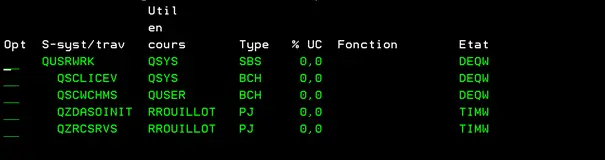
QZDASOINIThandles database operations via SQL.QZRCSRVShandles all classic AS/400 operations: CL commands, programs, and so on.
Structure of these two jobs
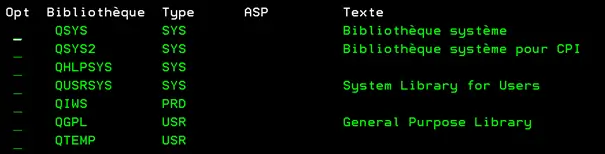
Library list of QZDASOINIT:
Library list of QZRCSRVS :
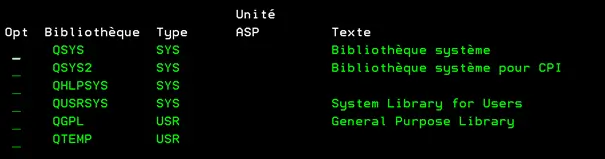
In both cases, a QTEMP library is present. Checking their contents via option 5 of WRKACTJOB:
The QTEMP library of QZDASOINIT contains the file TARTICL2:

The QTEMP library of QZRCSRVS contains the file TARTICL1:

Consequences
This is where things get tricky.
Running the SQL query:
SELECT * FROM QTEMP.TARTICL1⚠️ Message: file TARTICL1 not found in library QTEMP.
Running the CL command:
CPYF FROMFILE(QTEMP/TARTICL2) TOFILE(QGPL/TARTICL2) MBROPT(*REPLACE) CRTFILE(*YES)**⚠️ Message: file TARTICL2 not found in library QTEMP.
Running the SQL query:
SELECT * FROM QTEMP.TARTICL2✅ Completes normally.
Running the CL command:
CPYF FROMFILE(QTEMP/TARTICL1) TOFILE(QGPL/TARTICL2) MBROPT(*REPLACE) CRTFILE(*YES)✅ No error.
The issue stems from the fact that a SQL query targets the QTEMP associated with QZDASOINIT, while CL commands, programs and other AS/400 resources use the QTEMP of the QZRCSRVS job.
Since QTEMP usage is now considered legacy, it is mostly older applications that still rely on it. The relevant data almost always ends up in the QTEMP of QZRCSRVS, and therefore out of reach for SQL queries.
When reusing existing RPG, COBOL or CLP programs from .NET, situations like this can arise. One workaround is to use an intermediate CLP program to read the file from the correct QTEMP and surface the data in C#. But that means learning CL just to solve an infrastructure problem.
A solution
The C# function below takes as parameters the previously established IBM i connection (cx), the name of the QTEMP file to work with (QtempFile), and returns the data in a DataTable.
To clarify the comments, the following notations indicate which QTEMP each instruction targets:
QZDASOINIT/QTEMPQZRCSRVS/QTEMP
This function moves the target file from QZRCSRVS/QTEMP to QZDASOINIT/QTEMP to make it accessible via a SQL query.
public static DataTable QtempDt (NTiConnection cx, string QtempFile)
{
    var adapter = new NTiDataAdapter();
    DataTable dt = new DataTable();
    var cmd = cx.CreateCommand();

    cmd.CommandText = "SELECT * FROM QTEMP." + QtempFile;
    adapter.SelectCommand = cmd;

    // Data retrieval is done via SQL: the QtempFile file
    // will be looked up in the QTEMP associated with the QZDASOINIT job.

    try
    {
        // If the file was created by a SQL query, this instruction
        // executes successfully (file present in QZDASOINIT/QTEMP).
        adapter.Fill(dt);
    }
    catch
    {
        // Otherwise, the file must be copied from QZRCSRVS/QTEMP.
        // A temporary library is created with a unique name
        // based on the current time (HHMMSS) to avoid duplicates.

        string BibTemporaire = "LB" +
            DateTime.Now.ToString().Substring(11).Replace(":", "");

        cx.ExecuteClCommand("CRTLIB LIB(" + BibTemporaire + ")");

        // Uses QZRCSRVS/QTEMP: copies the file to the temporary library
        cx.ExecuteClCommand("CPYF FROMFILE(QTEMP/" + QtempFile + ") TOFILE(" +
            BibTemporaire + "/" + QtempFile + ") MBROPT(*REPLACE) CRTFILE(*YES)");

         // Creates the file in QZDASOINIT/QTEMP and copies the data
        cx.Execute("CREATE TABLE QTEMP." + QtempFile + " AS (SELECT * FROM " +
            BibTemporaire + "." + QtempFile + ") WITH DATA");

        // Deletes the temporary library
        cx.ExecuteClCommand("DLTLIB LIB(" + BibTemporaire + ")");

        // Data is loaded into the DataTable
        adapter.Fill(dt);

        // Deletes the QtempFile file from QZDASOINIT/QTEMP
        cx.Execute("DROP TABLE QTEMP." + QtempFile);
    }

    return dt;
}
Its execution speed allows this sequence of instructions to be inserted without impacting response times.
Bonus
Throughout this article, the QZDASOINIT and QZRCSRVS jobs have been mentioned. These jobs are prestart jobs: once started, they remain in a *WAIT state, ready to handle incoming requests. They are used by ODBC, OleDb, ACS and many others, including NTi Data Provider.
This *WAIT state is useful to offset the latency of external tools: the job is already standing by inside IBM i, ready to be woken up. The screenshot below shows both jobs after a request from a C# program using OleDb:
The screenshot below shows both jobs that handled a request from a C# program using OleDb:
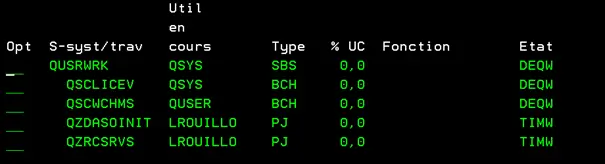
Both jobs are in *TIMW state, ready for a new request. The catch: the QTEMP from the previous request is still there, with the inconsistencies that can bring.
Normally, these jobs disappear after a period of inactivity. But they sometimes remain indefinitely in *TIMW state without being reused, causing a buildup in QUSRWRK that can be difficult to manage.
This risk does not exist with NTi Data Provider.
The QZDASOINIT and QZRCSRVS jobs started by NTi never enter *TIMW or *PSRW state when the C# session ends. They are systematically destroyed, even on abnormal program termination, and restarted and reinitialized at each new session. There is no risk of subsequent reuse, with no impact on performance.
Laurent Rouillot


