
 View the documentation



Cost reduction
Calling an RPG program from C# with NTi takes a few hours of integration. Rewriting it is a project in its own right, with its own cost and timeline.
With NTi Data Provider, natively call your existing IBM i programs from your .NET applications, without rewriting or duplicating a single line of business logic.
Your RPG programs represent an asset shaped over time to meet the needs of your business. They carry business logic, management rules, and an application identity that is unique to your organization.
NTi lets you call them directly from C# and integrate them into your new .NET projects, giving your business applications a long-term roadmap.
Calling an RPG program from C# with NTi takes a few hours of integration. Rewriting it is a project in its own right, with its own cost and timeline.
Your business processes are already running in production. Reusing them from .NET requires no additional validation.
Your business logic stays where it was built: you open it up to modern use cases with ease, without losing control over it.
Standard C#. Connection, parameters, call, result.
conn.CallProgram(...)
Call an existing IBM i program from C#, passing its parameters.
new NTiProgramParameter(...)
Declare each parameter expected by the program: input, output, or input/output.
conn.ExecuteClCommand(...)
Execute a CL command directly from your C# code.
A CLIENTS table and an RPG program CLIENTS2 (library MYLIB) handle validation, insertion, and data updates.
The web interface, built in Blazor (a .NET framework), calls the program directly, without rewriting the existing logic on IBM i.
using var conn = new NTiConnection(connectionString);
conn.Open();
// Add library
conn.ExecuteClCommand("ADDLIBLE LIB(MYLIB)");
// Parameter declaration
var parms = new List<NTiProgramParameter>
{
    new NTiProgramParameter("01", 2).AsInput(), // action code
    new NTiProgramParameter("", 2).AsOutput(), // return code
    new NTiProgramParameter("", 2).AsOutput(), // error code
    new NTiProgramParameter("", 10) // customer data structure (219 bytes)
        .Append(request.CompanyName ?? "", 20)
        .Append(request.PostalCode  ?? "", 5)
        .Append(request.Email       ?? "", 20),
    new NTiProgramParameter("", 10).AsOutput() // per-field validation flags
};
// Program call
conn.CallProgram("MYLIB", "CLIENTS2", parms);
Depending on the program signature, output parameters can carry return codes or business messages, directly usable for error handling on the .NET side.
View the full example.
IBM i side
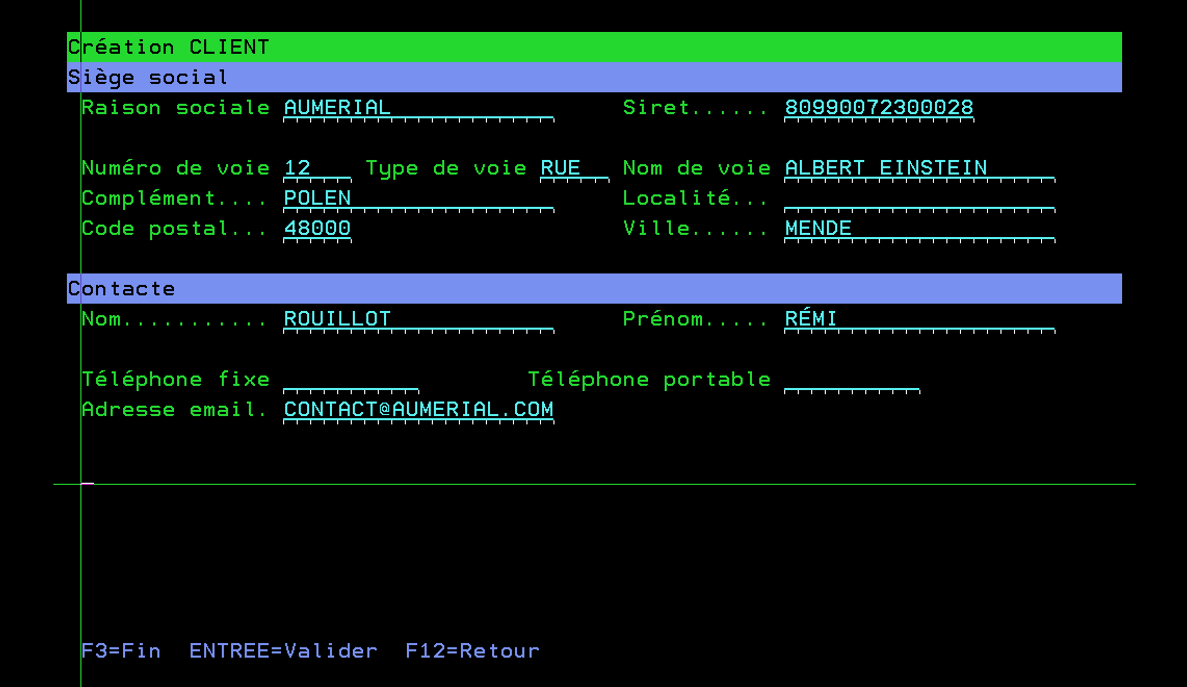 Customer data entry on the 5250 screen, before validation by the RPG program.
.NET application side
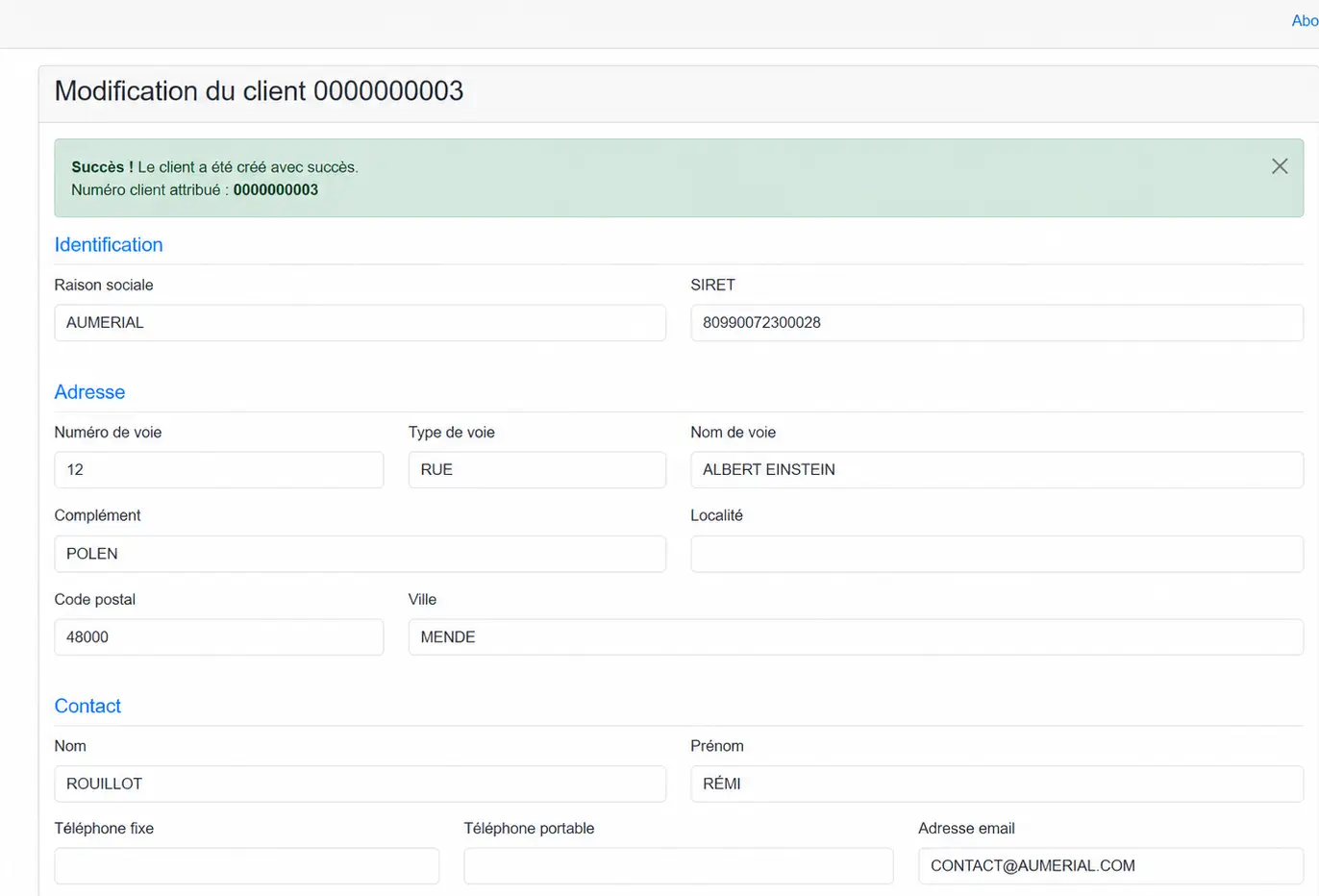 The new customer record, with its number generated by IBM i, is returned to the .NET application.
Call any compiled program from C#, as long as its parameter interface is known.
Automate your IBM i operations from .NET: library creation, object management, batch job triggering.
Call procedures exposed in a service program, via the Toolbox extension.
CallServiceProgramProcedure
Access IBM i system resources from .NET by implementing calls to the QSYS APIs documented by IBM.
Deploy your .NET application wherever you want. NTi bridges the gap to IBM i.
A single NuGet package to reference in your .NET project, no client driver.
NTi uses the standard TCP/IP services already active on your system.
Windows, Linux, ARM64, Docker, cloud. Anywhere .NET runs.
NTi also provides access to DB2 for i data via the standard ADO.NET or with the EF Core extension.
"With cloud-native, cross-platform solutions, the application adapts to the infrastructure. Not the other way around."
Expose your IBM i processes as APIs, consumable from a web portal or mobile application, without rewriting the business logic.
Build clean, intuitive .NET interfaces around your existing IBM i programs, without duplicating the business logic.
Trigger and control your IBM i operations directly from your .NET applications, without going through a 5250 screen or a third-party tool.
Create your account, install your license,
and start your trial immediately, on your own.
NTi Data Provider lets you call any RPG, RPGLE, or CLP program from C# via the CallProgram method, by declaring the input, output, and input/output parameters expected by the program.
The returned values (results, return codes, or business messages) are then immediately usable in the .NET application.
With NTi Data Provider, the ExecuteClCommand method lets you execute any CL command directly from a C# application.
Commands are sent to the IBM i server dedicated to remote commands AS-RMTCMD, then executed natively by the system, with no SQL, no 5250 screen, and no intermediate component.
Yes. NTi lets you directly reuse existing RPG, RPGLE, CLP programs and service programs (SRVPGM) from a .NET application. Processing continues to run on IBM i: no rewriting or modification of the programs is required.
No. No software component needs to be installed on the IBM i. Once the NTi license is installed, the provider relies solely on the system's standard TCP/IP services, namely *DATABASE, *RMTCMD, and *SIGNON.
On the application side, simply add the NTi NuGet package to your .NET project.
Yes. NTi is a 100% .NET component, with no native driver to install. The application calling your IBM i programs can run on Windows, Linux, ARM64, ppc64le, or in a container, regardless of the platform, without modifying the application code.


 Docker container
