In the first two episodes, we connected Claude to IBM i and gave it the ability to query and update a DB2 for i database.
This article is part of a series on using an AI agent with IBM i through the Model Context Protocol:
- Build an MCP server in .NET to connect IBM i AS400 to an AI
- Read and Write SQL on DB2 for i from .NET with an MCP Server
- Call an IBM i RPG Program from .NET with an AI Agent (this article)
In this article, we are going to analyze the source code of an IBM i RPG program and call it from .NET through Claude Desktop using NTi data provider.
Architecture of the .NET MCP Server Connected to IBM i
We start from the episode 2 project, unchanged.
We create a new RPG folder and add the RPGTools.cs class to it.
The Program.cs therefore becomes:
// … code
.WithTools<TranslogTools>();
.WithTools<RPGTools>();
IBM i RPG Program Example: CALCPRIX
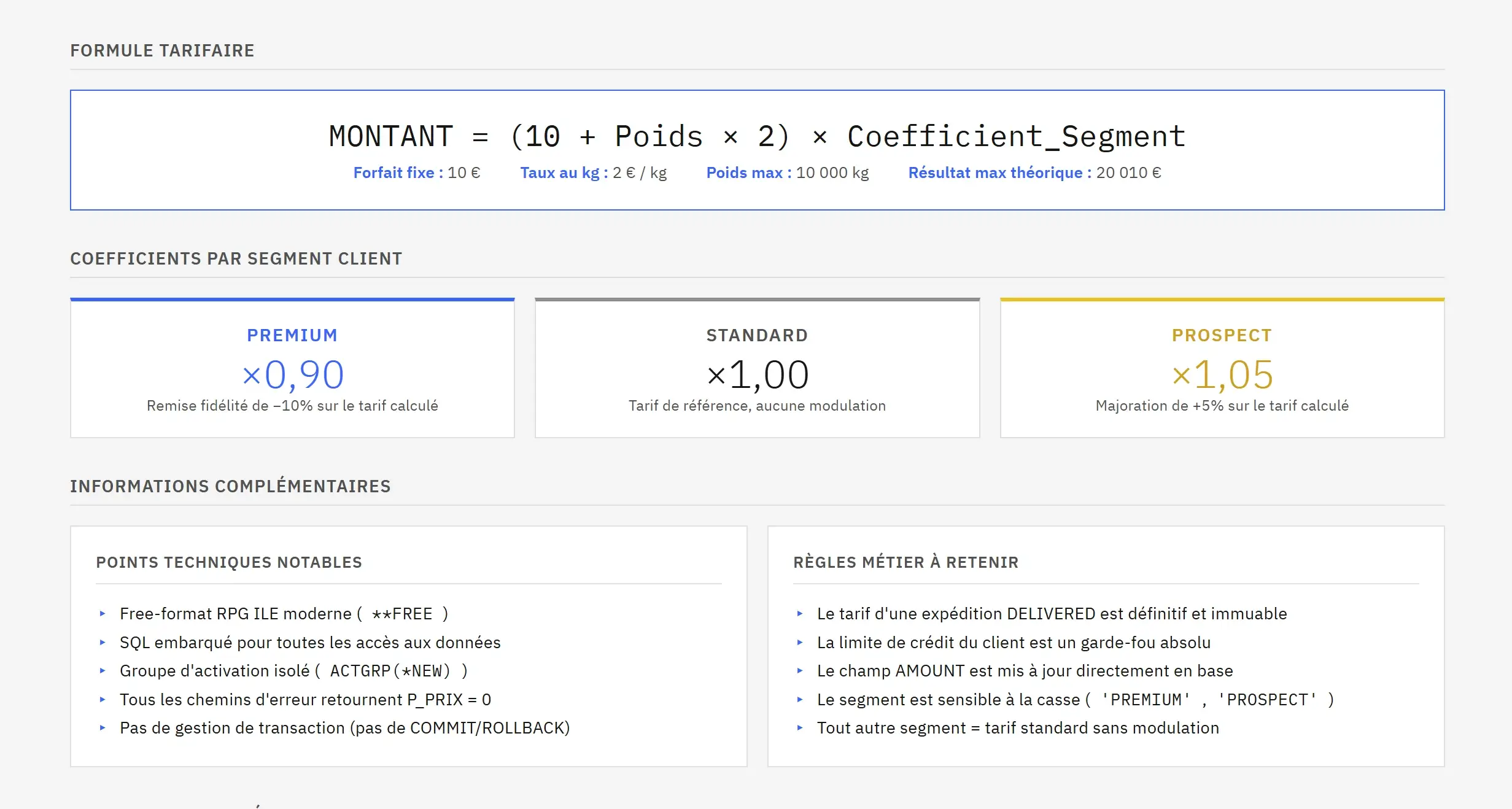
CALCPRIX is a free-format RPG program compiled in the TLOG library. It encapsulates the pricing logic of Translog, the company we covered in the previous episode.
Current pricing rules:
- Base rate: $10 + $2/kg
- PREMIUM customer: 10% discount
- PROSPECT customer: 5% surcharge
- STANDARD customer: no discount or surcharge
- Weight > 10,000 kg: rejected
- Amount exceeds customer credit limit: rejected
Program parameters:
| Parameter | IBM i Type | Direction | Description |
|---|---|---|---|
P_SHIPID |
CHAR(10) | Input | Shipment identifier |
P_PRIX |
PACKED(11:2) | Output | Calculated rate |
P_MSG |
CHAR(50) | Output | Success or rejection reason |
Analyze an IBM i RPG Program with an AI Agent
Part 1 - Thomas Discovers CALCPRIX
Thomas is a .NET developer who just joined Translog.
He's been told there is an RPG program somewhere in the TLOG library that handles pricing calculations. His job is to integrate it into a new .NET application, that's all he knows.
He has no access to documentation, since there isn't any. And Thomas doesn't really know RPG, he doesn't know what parameters the program expects, what it returns, or what logic applies.
He opens Claude Desktop and types:
💬 Thomas's Prompt
" Analyze the RPG program CALCPRIX in the TLOG library and explain how it works. "
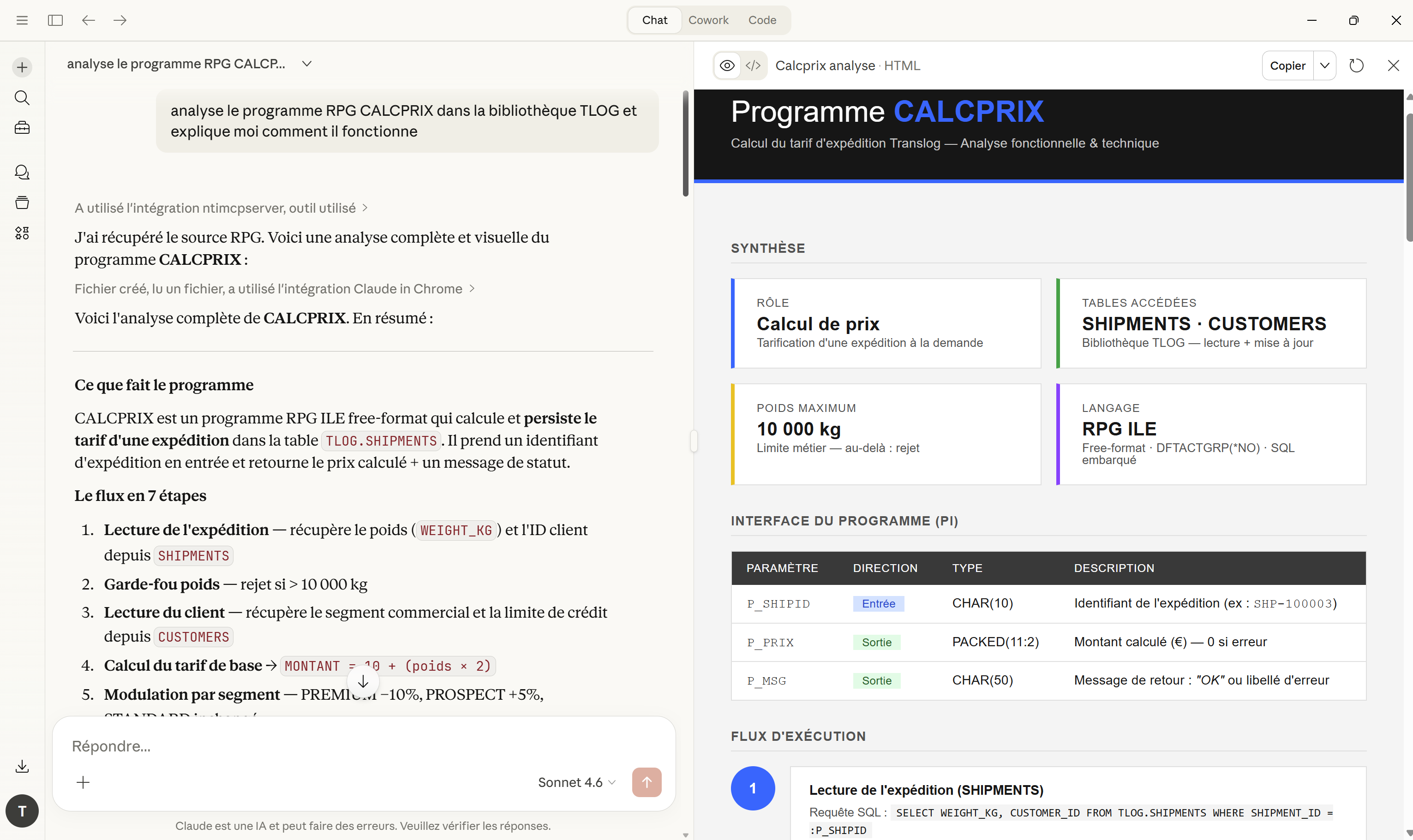
Claude calls the already defined ReadRpgSource tool and retrieves the source code lines of the RPG program. It analyzes them and responds directly: business logic explanation, description of input/output parameters with their IBM i types etc.
Thomas didn't open a single 5250 screen. He didn't need to reach out to an RPG expert or look up any documentation.
ReadRpgSource()
The tool used by Thomas runs a SQL query on the QRPGLESRC source file on the IBM i to retrieve the source code lines of the RPG program. Claude receives the code exactly as a developer would read it in an editor.
[McpServerTool]
[Description("Read RPG program source code from QRPGLESRC")]
public string ReadRpgSource(
    [Description("Library name")] string library,
    [Description("RPG program name")] string program)
    {
        var sql = _conn.Query($@"
        SELECT SRCDTA
        FROM {library.ToUpper()}.QRPGLESRC
        ORDER BY SRCSEQ");

        if (!sql.Any())
            return $"Program {program} not found in {library}";

        return string.Join(Environment.NewLine, sql);
    }
The QRPGLESRC source file used in this example contains only a single member.
A simple SQL query is therefore enough to retrieve the program lines in order and reconstruct the full source code.
As long as an RPG program can be read from SQL, Claude can do much more than explain its signature.
For instance it can identify bad practices, spot uninitialized variables or duplicated code blocks in an existing program. It can also convert legacy column-based RPG into FREE RPG while explaining the changes, or generate technical documentation for an undocumented program.
Most IBM i teams have hundreds of programs across their libraries. This tool gives any developer, regardless of their RPG knowledge level, immediate access to their business logic.
This approach is especially valuable in migration or modernization projects. Rather than rewriting blindly, you can first analyze and understand the existing business rules, then decide what to keep and what to refactor.
Call an IBM i RPG Program from .NET
Part 2 - Sylvie and the Pricing Update
Upper management at Translog just decided to revise their pricing structure. The per-kilogram rate is moving from $2/kg to $3/kg, effective immediately. A colleague of Thomas has already updated the rule in the CALCPRIX RPG program.
What remains now is to recalculate the rates for shipments already in progress.
Sylvie is a sales manager at Translog, we met her in the previous article. She has no idea what an RPG program is, has no access to ACS, and has no reason to care.
She opens Claude Desktop:
💬 Sylvie's Prompt
“ The TRANSLOG pricing structure has changed. Recalculate the rate for shipment SHP-100007 ”.
Claude proceeds in two steps. It first calls GetShipmentsByStatus to list the relevant shipment and presents Sylvie with a summary of the current rates.
After confirmation, it calls the CalculateTranslogShipmentRate tool for the selected shipment. Each call triggers CALCPRIX on the IBM i, which applies the new pricing schedule and updates AMOUNT directly in the database.
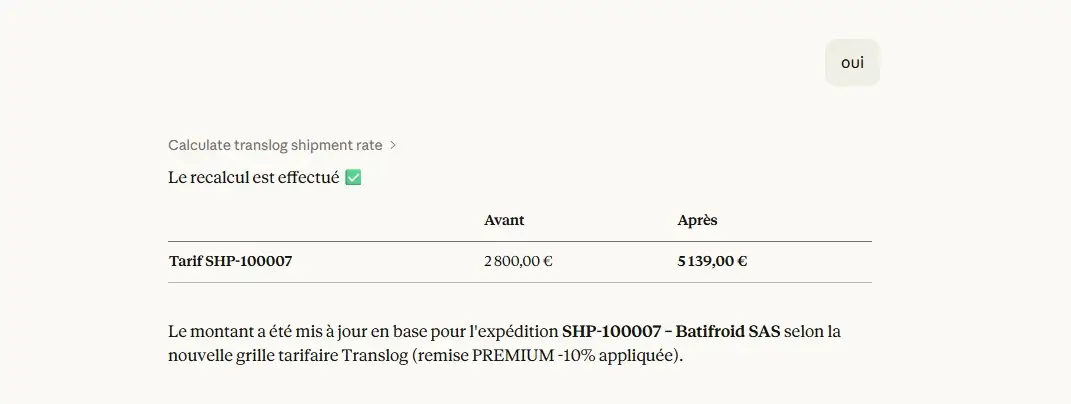
Example 1 - SHP-100007, Batifroid SAS, PREMIUM, 1,900 kg
Claude displays the shipment details, reminds Sylvie of the pricing rules applicable to the PREMIUM segment, and asks for confirmation before calling the program.
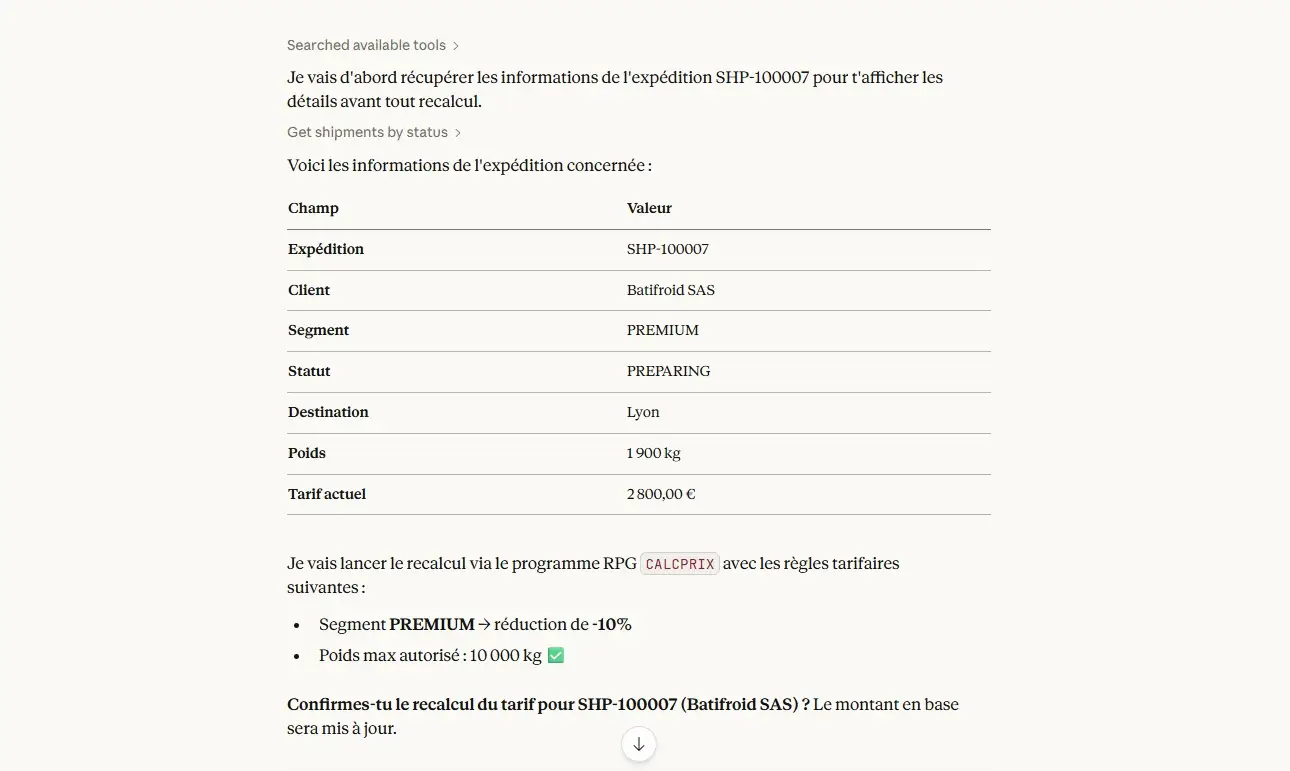
Sylvie confirms.
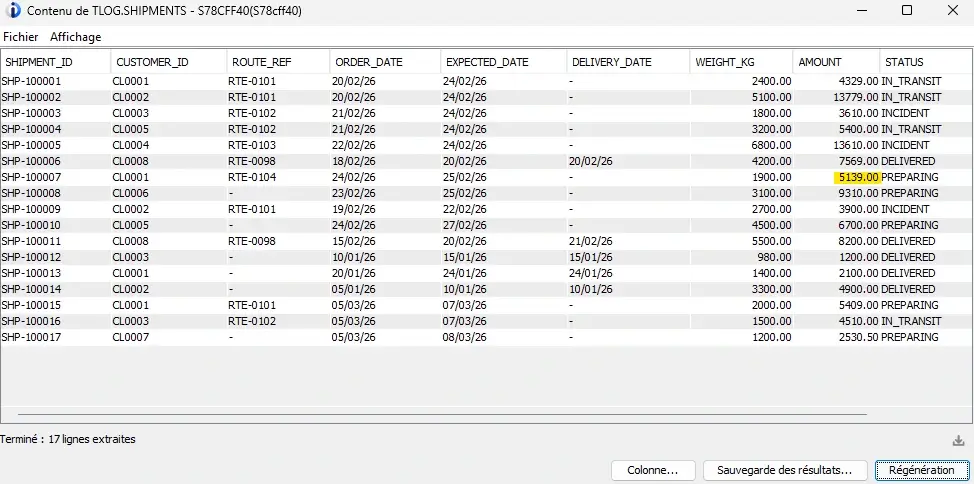
The CALCPRIX RPG program is then called, the 10% discount is applied and the rate goes from $2,800 to $5,139.
The update is immediately visible in ACS.
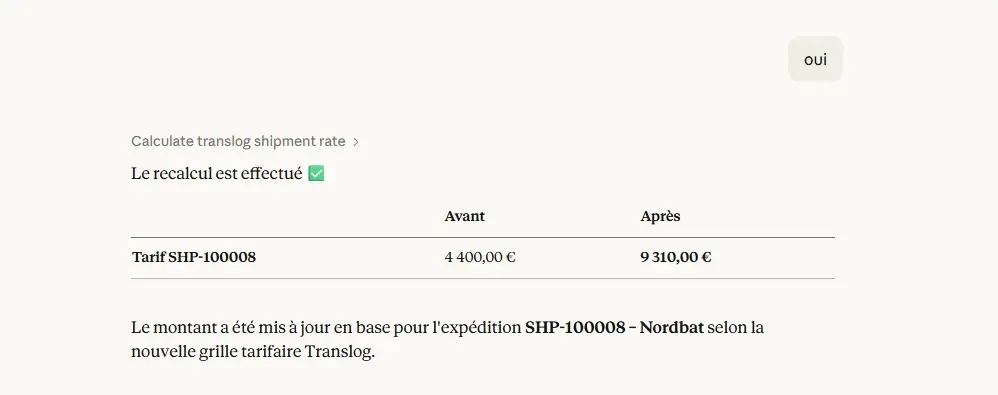
Example 2 - SHP-100008, Nordbat, STANDARD, 3,100 kg
Same process.
STANDARD segment, no discount or surcharge. The rate goes from $4,400 to $9,310.
Example 3 - SHP-100012, DELIVERED status
Sylvie asks to update the rate for SHP-100012. Claude checks the shipment, notices the DELIVERED status, and refuses to call the program.
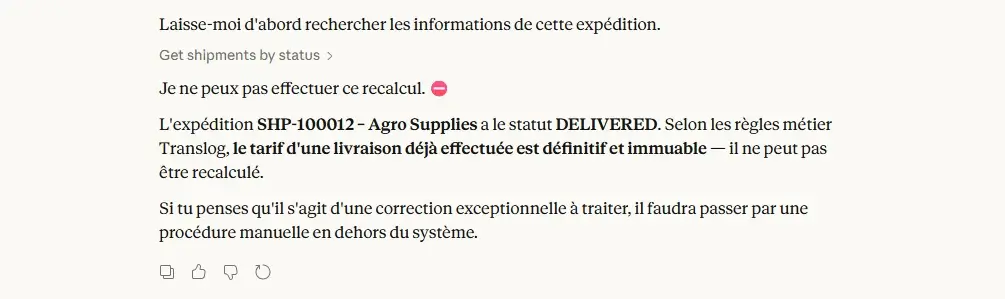
💡The rule is defined in the tool description: the rate of an already completed delivery is final and cannot be changed.
Claude cannot do anything, it respects the business constraints it has been given.
CalculateTranslogShipmentRate()
This tool was implemented by Thomas, the .NET developer.
After analyzing CALCPRIX through ReadRpgSource, he was able to understand the program logic and identify its parameters. This allowed him to configure the tool with the necessary business rules (prior confirmation required, DELIVERED status locked, etc.) to ensure the program is used correctly from Claude.
The logic runs in three steps: build the parameter list matching the program signature exactly, call the program, and read the outputs:
[McpServerTool]
[Description(@"
    Calculate the rate for a shipment through the CALCPRIX RPG program on the IBM i.
    This program reads the weight from SHIPMENTS, the customer segment from CUSTOMERS,
    applies the Translog pricing rules and updates the AMOUNT field.
    IMPORTANT: this tool modifies data on the IBM i.
    Before calling it, you MUST:
   1. Show the user the SHIPMENT_ID and the name of the customer involved.
   2. Remind the rules: PREMIUM -10%, PROSPECT +5%, max weight 10,000kg.
   3. Ask for explicit confirmation before calling the program.
   BUSINESS RULE:
   Shipments with DELIVERED status must never be recalculated.
   The rate of an already completed delivery is final and cannot be changed.

   Only call the program after receiving clear approval.")]

public string CalculateTranslogShipmentRate(
    [Description("Shipment identifier (e.g. SHP-100003)")] string shipmentId)
{
    var parms = new List
    {
        new NTiProgramParameter(shipmentId, 10).AsInput(),
        new NTiProgramParameter(0m, 11, 2).AsOutput(),
        new NTiProgramParameter("", 50).AsOutput()
    };

    _conn.CallProgram("TLOG", "CALCPRIX", parms);

    var prix = parms[1].GetPackedDecimal(11, 2);
    var msg = parms[2].GetString().Trim();

    if (msg == "OK")
        return $"Rate successfully calculated : {prix:C} - AMOUNT updated for {shipmentId}";
    else
        return $"Error : {msg}";
}
One NTiProgramParameter is created per parameter expected by the program, in the same order as the RPG signature. The types must match exactly those defined on the IBM i side: CHAR(10) for the input SHIPMENT_ID, PACKED(11:2) for the output rate, CHAR(50) for the return message.
A single line is enough to call the program:
_conn.CallProgram("TLOG", "CALCPRIX", parms);NTi opens a session on the IBM i and runs CALCPRIX in its native environment. After the call, the outputs are read directly from the parameters:
var prix = parms[1].GetPackedDecimal(11, 2);
var msg  = parms[2].GetString().Trim();
Conclusion
To call an RPG program from .NET with NTi is straightforward: declare the parameters, call the program, and read the outputs.
In this example, Claude was able to:
- read the RPG source code directly from the IBM i
- understand the business logic of the program
- call the program to update shipment rates
Most IBM i systems already have hundreds of RPG programs that implement business-specific rules: core processes, custom calculations, and years of accumulated know-how. With an MCP server, these programs can be analyzed, documented and called directly without rewriting them.
This also opens the door for .NET developers to work with an IBM i system without having to master every technical detail upfront, provided of course that appropriate tools and security rules are defined. And in many cases, this is a far more realistic path to modernize a system than starting from scratch.
Quentin Destrade


