In the previous article, we laid the groundwork: creating an MCP server in .NET, connecting it to IBM i using NTi data provider, and exposing a first tool to Claude Desktop.
This article is part of a series on using an AI agent with IBM i through the Model Context Protocol:
- Build an MCP server in .NET to connect IBM i AS400 to an AI
- Read and Write SQL on DB2 for i from .NET with an MCP Server (this article)
- Call an IBM i RPG Program from .NET with an AI Agent
In this article, we focus on data: SQL queries with joins, multi-step reasoning by the AI agent, and a first database write operation with user confirmation.
Business Use Case: Querying DB2 for i in Natural Language from Claude Desktop
Sylvie is a Sales Manager at Translog. This morning, she opens Claude Desktop and types:
" Give me a report on today’s activity ".
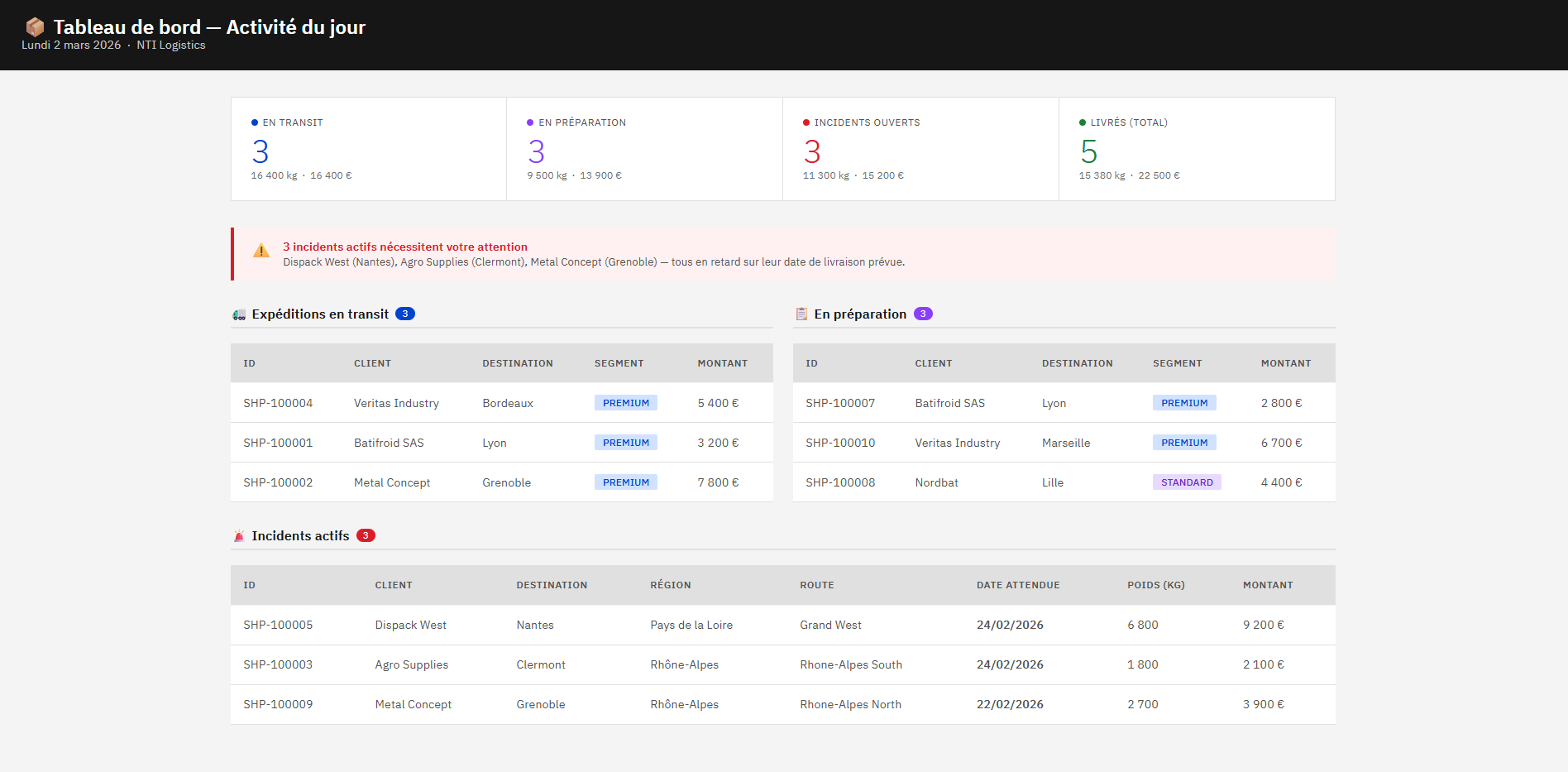
Thirty seconds later, she has a structured dashboard: number of shipments in transit and in preparation, open incidents highlighted with visual alerts, today’s deliveries, along with the associated amounts and volumes. All data is organized by customer, destination, and status, without opening a single 5250 screen, Sylvie doesn't have IBM i expertise, after all.
That's the premise of this article: a single .NET project, four tools, and a demo that goes from a simple dashboard to a live database write.
Architecture of the .NET MCP Project Connected to IBM i Using NTi
For this article, we build on the project created in episode 1.Three changes are required before we begin:
- Delete the Admin and the
AdminToolsclass it contains. - Create an SQL folder and add the
TranslogTools.csclass to it. - Update
program.csto reference the new class instead of the previous one.
Claude can see all available tools at the same time.
IfAdminToolsis still present, the model may choose to call it even though it is not relevant to this scenario.
The program.cs therefore becomes:
// ... code
.WithTools<TranslogTools>();
DB2 for i Data Modeling: Business Schema and Relational Tables
Translog is a fictional logistics and freight company. It manages delivery routes, assigns drivers, tracks customer shipments, and handles incidents along the way.
The DB2 for i schema TLOG contains five interrelated tables:
| Table | Purpose |
|---|---|
TLOG.CUSTOMERS |
Customers with commercial segment (PREMIUM / STANDARD / PROSPECT) |
TLOG.DRIVERS |
Drivers and license type |
TLOG.ROUTES |
Delivery routes with assigned driver |
TLOG.SHIPMENTS |
Shipments linked to a customer and a route |
TLOG.INCIDENTS |
Open incidents related to shipments |
The shipment status SHIPMENTS.STATUS follows a defined lifecycle: PREPARING → IN_TRANSIT → DELIVERED with possible transitions to INCIDENT or CANCELLED. This is the field Claude will query to filter the data.
INCIDENTSis a separate table linked to a shipment. An incident has a type (DELAY, DAMAGE, ADDRESS...), and a RESOLVEDflag that will change from0to1` during our write demonstration.
Finally, ROUTES are linked to both DRIVERS and shipments. A shipment can exist without an assigned route if it is in PREPARING status. This detail will matter when we build the joins.
The complete SQL script for creating the schema and sample data is available here.
Building MCP Tools Optimized for DB2 for i
Before writing a single tool, one question stands out: how much logic should live in .NET, and how much should be handled by DB2?
The answer is straightforward for anyone familiar with IBM i: DB2 for i is built to execute this type of workload. Joins, aggregates, date functions, grouping… these operations are optimized at the SQL engine level. Pulling raw rows into .NET to process them there would mean bypassing decades of optimization built into the relational engine.
Each tool developed below follows this principle. We return only what Claude actually needs, and let DB2 for i do the heavy lifting.
Get Dashboard
First tool:
Each query returns a single value, a COUNT or a SUM, and .NET receives only the final result.COALESCE prevents returning a NULL if no shipments exist for the selected period.
[McpServerTool]
[Description("Returns a summary of today's activity: shipments in transit, shipments being prepared, open incidents, active routes, and revenue for the current month vs previous month.")]
public async Task<object> GetDashboard()
 {
     return new
     {
         ShipmentsInTransit = await _conn.ExecuteScalarAsync("SELECT COUNT(*) FROM TLOG.SHIPMENTS WHERE STATUS = 'IN_TRANSIT'"),
         ShipmentsBeingPrepared = await _conn.ExecuteScalarAsync("SELECT COUNT(*) FROM TLOG.SHIPMENTS WHERE STATUS = 'PREPARING'"),
         OpenIncidents = await _conn.ExecuteScalarAsync("SELECT COUNT(*) FROM TLOG.INCIDENTS WHERE RESOLVED = '0'"),
         ActiveRoutes = await _conn.ExecuteScalarAsync("SELECT COUNT(*) FROM TLOG.ROUTES WHERE STATUS = 'IN_PROGRESS'"),
         RevenueCurrentMonth = await _conn.ExecuteScalarAsync(@"
             SELECT COALESCE(SUM(AMOUNT), 0)
             FROM TLOG.SHIPMENTS
             WHERE YEAR(ORDER_DATE)  = YEAR(CURRENT DATE)
             AND MONTH(ORDER_DATE) = MONTH(CURRENT DATE)"),
         RevenuePreviousMonth = await _conn.ExecuteScalarAsync(@"
             SELECT COALESCE(SUM(AMOUNT), 0)
             FROM TLOG.SHIPMENTS
             WHERE YEAR(ORDER_DATE)  = YEAR(CURRENT DATE - 1 MONTH)
             AND MONTH(ORDER_DATE) = MONTH(CURRENT DATE - 1 MONTH)")
     };
 }
💬 Sylvie’s Prompt
“ Give me a report on today’s activity ”
GetTopCustomers (join, GROUP BY and parameters)
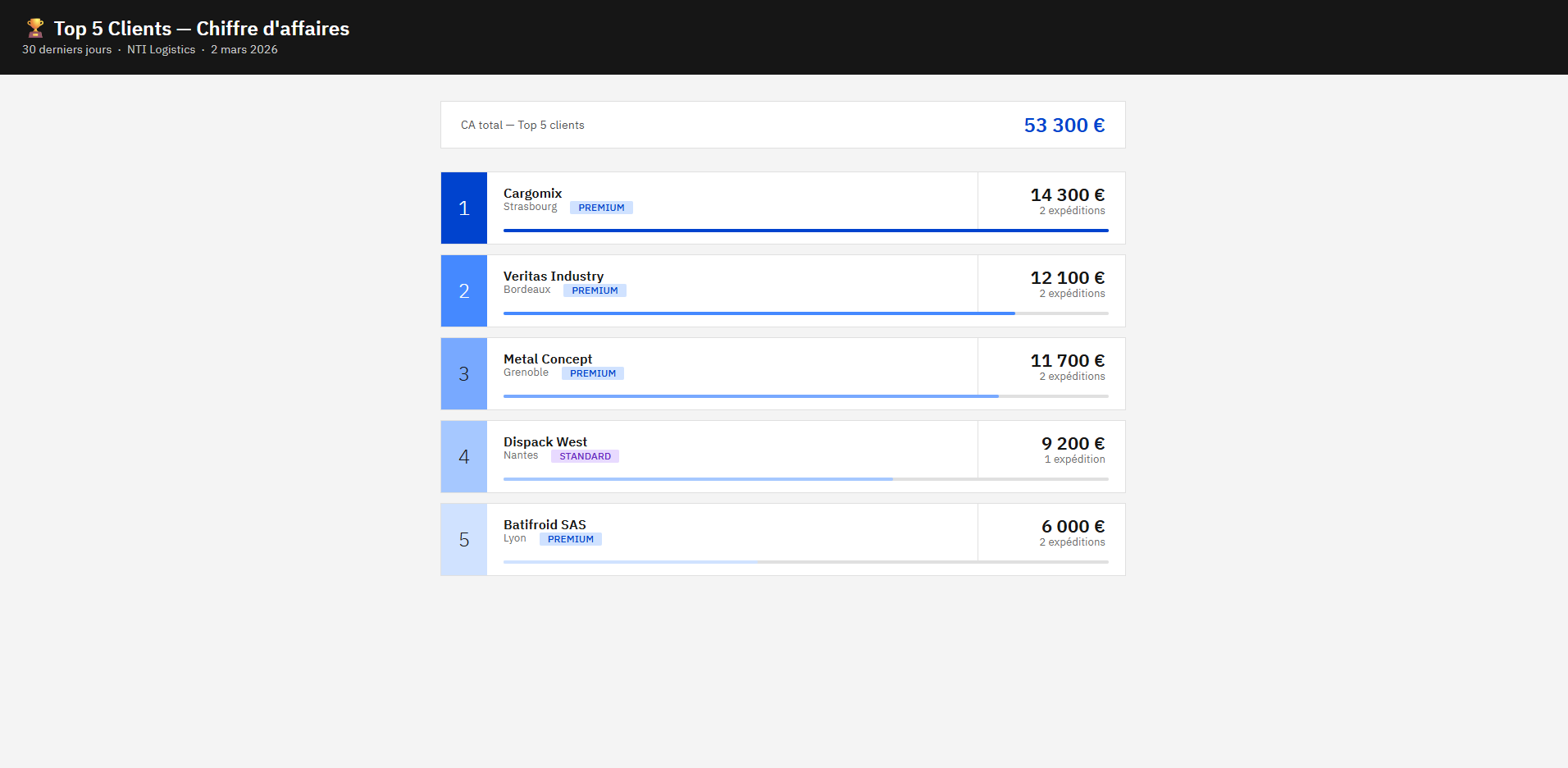
This method returns the top N customers by revenue over the last 30 days.
It performs a join between TLOG.CUSTOMERS and TLOG.SHIPMENTS to associate each shipment with its customer, aggregates the data per customer using COUNT and SUM, and sorts the result by revenue in descending order.
The FETCH FIRST {top} ROWS ONLY clause limits the number of rows returned.
On the .NET side, you receive a pre-aggregated result set that is ready to display.
[McpServerTool]
[Description("Returns the top N customers by revenue over the last 30 days, with their shipment count, total amount, city and segment.")]

public IEnumerable GetTopCustomers(
      [Description("Number of customers to return (e.g. 5)")] int top)
{
    return _conn.Query($@"
        SELECT
            c.CUSTOMER_ID,
            c.COMPANY_NAME,
            c.CITY,
            c.SEGMENT,
            COUNT(s.SHIPMENT_ID) AS SHIPMENT_COUNT,
            SUM(s.AMOUNT)        AS REVENUE_30D
        FROM TLOG.CUSTOMERS c

        JOIN TLOG.SHIPMENTS s
            ON  c.CUSTOMER_ID = s.CUSTOMER_ID
            AND s.ORDER_DATE >= CURRENT DATE - 30 DAYS

        GROUP BY
            c.CUSTOMER_ID,
            c.COMPANY_NAME,
            c.CITY,
            c.SEGMENT

        ORDER BY REVENUE_30D DESC
        FETCH FIRST {top} ROWS ONLY
        ");
}
💬 Sylvie’s Prompt
“ Who are my top 5 customers by revenue this month? ”
GetTopShipmentsByStatus (INNER JOIN vs LEFT JOIN)
This method returns shipments filtered by status, with the associated customer and route information.
Each shipment is necessarily linked to a customer: an INNER JOIN with CUSTOMERS is used. However, a shipment with status PREPARING may not yet be assigned to a route. To avoid losing these rows in the result, the join with ROUTES is done as a LEFT JOIN.
[McpServerTool]
[Description("Returns shipments filtered by status, with customer name, segment, assigned route and region. Allowed values: PREPARING, IN_TRANSIT, DELIVERED, INCIDENT, CANCELLED.")]
public IEnumerable GetShipmentsByStatus(
    [Description("Shipment status to filter on")] string status)
{
    return _conn.Query(@"
        SELECT
            s.SHIPMENT_ID,
            s.ORDER_DATE,
            s.EXPECTED_DATE,
            s.DEST_CITY,
            s.WEIGHT_KG,
            s.AMOUNT,
            s.STATUS,
            c.COMPANY_NAME,
            c.SEGMENT,
            r.LABEL  AS ROUTE_LABEL,
            r.REGION
        FROM TLOG.SHIPMENTS s
        JOIN      TLOG.CUSTOMERS c ON s.CUSTOMER_ID = c.CUSTOMER_ID
        LEFT JOIN TLOG.ROUTES   r ON s.ROUTE_REF   = r.ROUTE_REF
        WHERE s.STATUS = @status
        ORDER BY s.ORDER_DATE DESC
        ",
        new { status });
}
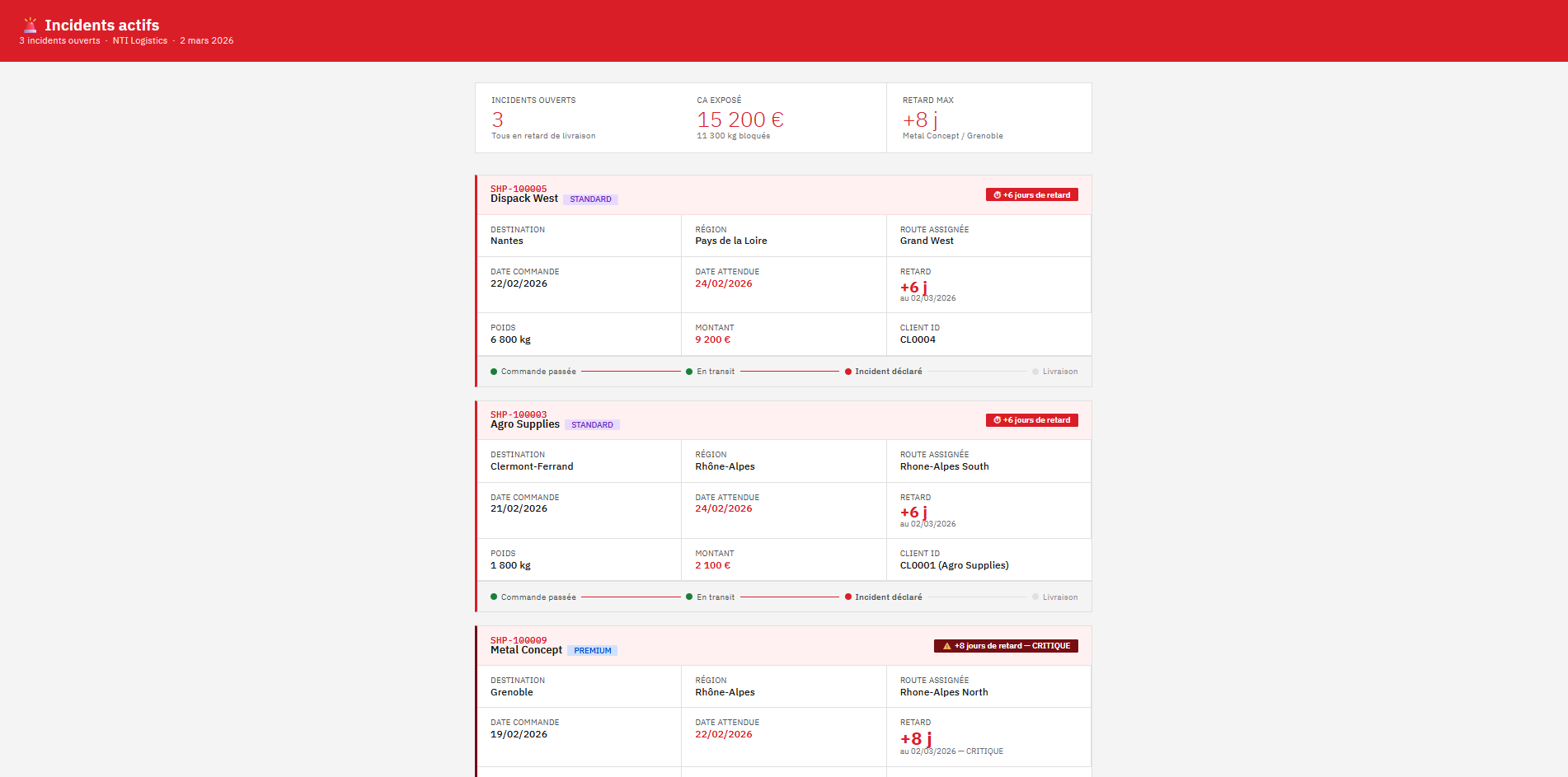
💬 Sylvie’s Prompt
“ Can you show me the details of the ongoing incidents? ”
DB2 for i Write Operations from an AI Agent with User Confirmation
ResolveIncident()
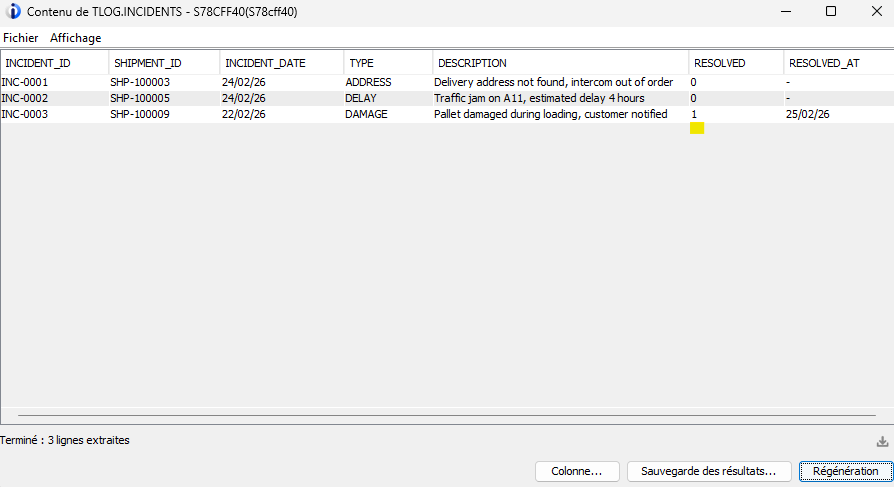
This method closes an incident in the DB2 for i database. It executes an UPDATE on TLOG.INCIDENTS to set RESOLVED to 1 and populate RESOLVED_AT with CURRENT DATE, evaluated on the IBM i side.
The user confirmation mechanism is not coded in C#, but defined in the tool description. It is this description that constrains the agent to request explicit validation before any write to the database.
[McpServerTool]
[Description(@"Marks an incident as resolved and sets today as the resolution date.
            IMPORTANT: this tool writes to the database.
            Before calling it, you MUST:
            1. If you only have a shipment ID, call GetShipmentsByStatus first to retrieve the associated incident ID.
            2. Warn the user that you are about to modify data in the IBM i database.
            3. Show them the shipment ID and the customer name: not the technical incident ID.
            4. Ask for explicit confirmation before proceeding.
            Only proceed after receiving a clear approval.")]
public string ResolveIncident(
[Description("Incident identifier to close (e.g. INC-0001)")] string incidentId)
{
    var rows = _conn.Execute(@"
        UPDATE TLOG.INCIDENTS
        SET
            RESOLVED    = '1',

            RESOLVED_AT = CURRENT DATE

        WHERE INCIDENT_ID = @incidentId
        ",
        new { incidentId });

    return rows > 0
        ? $"Incident {incidentId} marked as resolved"
        : $"Incident not found: {incidentId}";
}
Now let’s go back to Sylvie. In the previous dashboard, she sees that SHP-100009 (Metal Concept, 3 days late, PREMIUM customer) is marked as a critical incident. The driver has just called her back: the delivery was completed this morning, so she wants to close the incident.
💬 Sylvie’s Prompt
“ The incident on SHP-100009 is resolved, the driver delivered this morning. Can you close it? ”
Claude proceeds step by step. It first calls GetShipmentsByStatus to retrieve the technical incident identifier linked to SHP-100009. Then it stops and presents a summary to Sylvie:
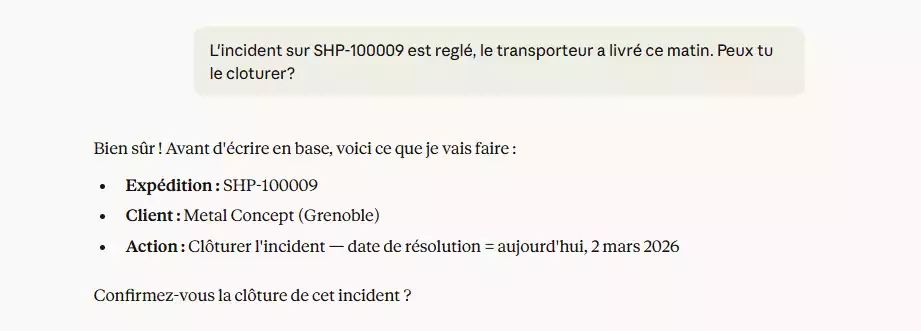
Sylvie replies “ yes ”. Claude then calls ResolveIncident, and the SQL update is executed on DB2 for i.
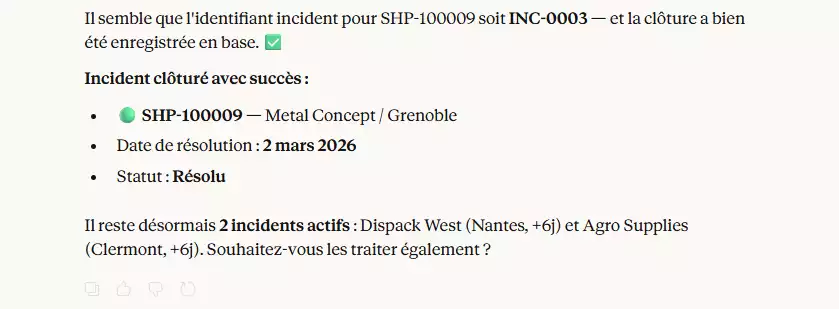
After closing the incident, Sylvie wants to verify that everything is resolved:
💬 Sylvie’s Prompt
“ Show me the open incidents ”
The dashboard refreshes.
SHP-100009 no longer appears in the list of active incidents. A green banner at the top confirms that the incident was closed today.
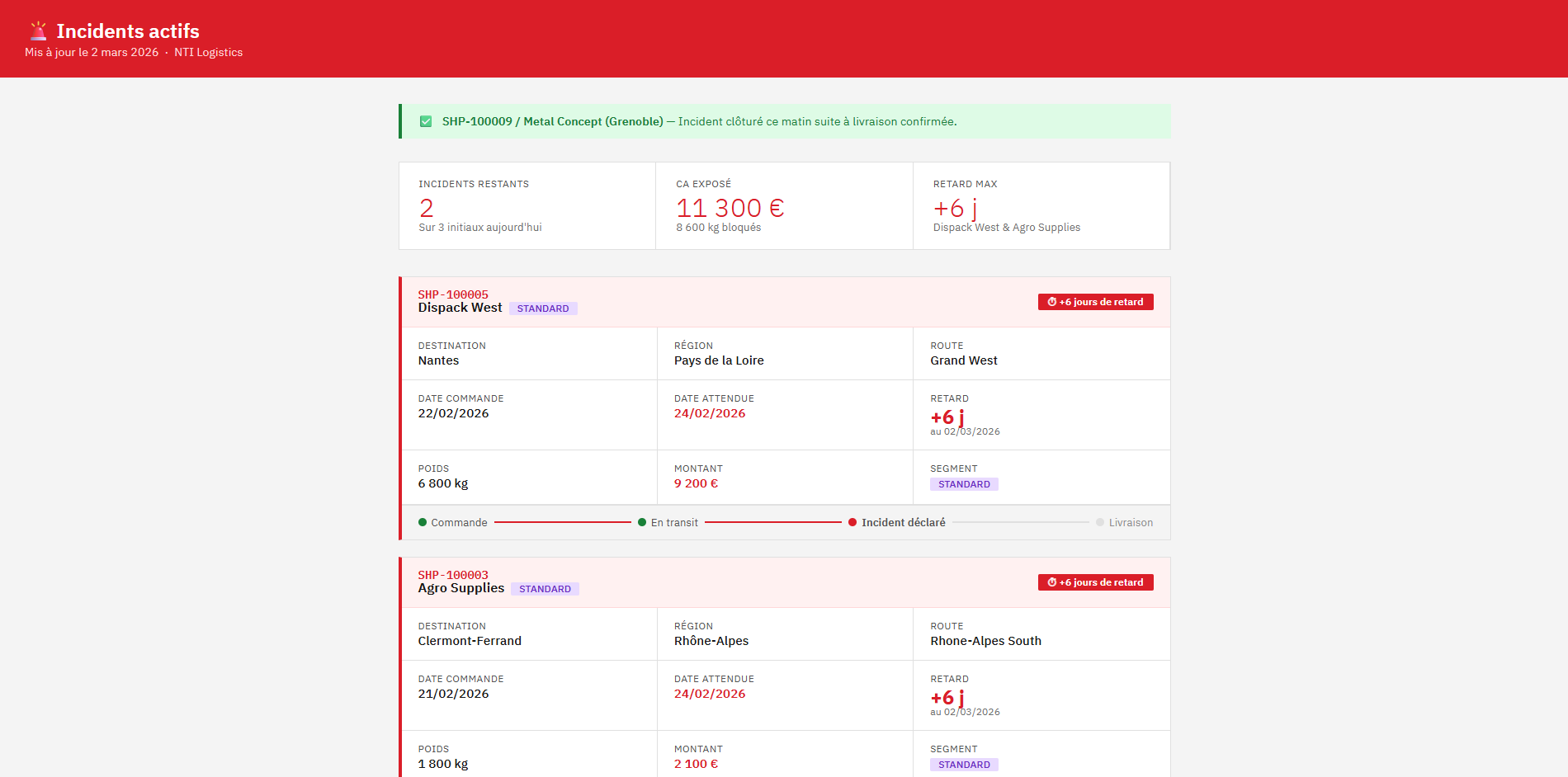
A database write on IBM i, triggered from a natural language request, confirmed by the user, and immediately reflected in a refreshed dashboard view, or directly in ACS:
IBM i Security and Access Control in an MCP Server
Two important points:
- IBM i user profile authorities apply. If the NTi connection uses a read-only profile, any write attempt will fail at the DB2 level.
- The agent can only perform the actions exposed through the tools. It has no direct access to DB2 and does not generate its own SQL queries. The scope of action is strictly what you define, tool by tool.
It is also possible to precisely control which tools Claude is allowed to use directly from the Connectors tab in Claude Desktop.
This allows you to restrict access to specific tools depending on the context or the user.

Practical tip: start with a dedicated IBM i profile with read-only access to the relevant tables. Grant write permissions progressively, table by table, testing each tool individually.
HTML Rendering Configuration IBM Carbon Design System in Claude Desktop
The screenshots in this article display an IBM Carbon Design System rendering, even though Sylvie did not specify anything in her prompts.
This behavior is configured once in Settings → Claude Desktop Profile
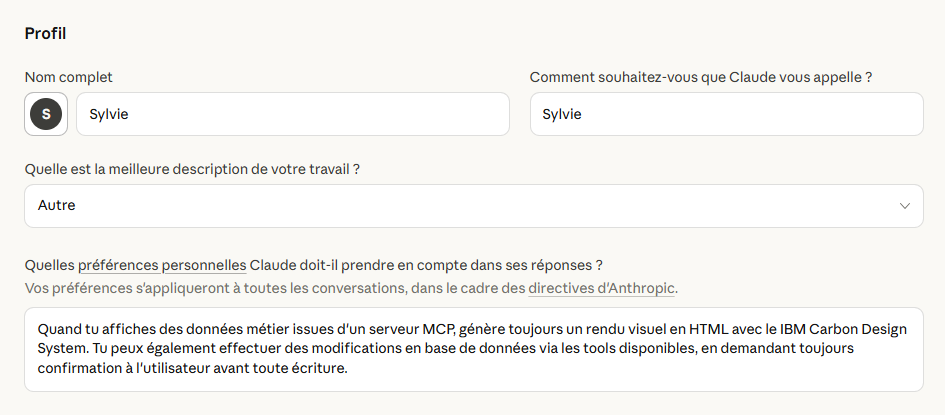
This instruction applies to all conversations.
No matter how Sylvie phrases her question, in French, in English, with typos… Claude understands the intent, calls the appropriate tools, and automatically generates the rendering.
With this episode, Sylvie now has an assistant that can query IBM i, correlate business data, and close an incident in the database, all from Claude Desktop using natural language.
Everything relies on four tools, a single NTi connection, and well-crafted tool descriptions. That’s it!
Quentin Destrade


